We don’t score your skin. We make your own two photos comparable.
Most progress-photo apps will compare any two pictures you hand them. Which means the thing you watch change is usually the bathroom light. SameLight reads the light, the colour of that light, the distance and your head angle before it lets you take the shot — and when two photos score below 70 for comparability, it does not draw the comparison at all.
Everything is unlocked for the first 14 days. Capture, analysis, comparison and the full export stay free after that.
- iPhone · iOS 17+
- 6 languages
- No account
- Photos stay on the device
Standardize first. Then, and only then, compare.
Three things the app does differently, and each of them costs you something — a slower shutter, a comparison you sometimes do not get, a revenue model with nothing else in it.
Four readings before the shutter will fire
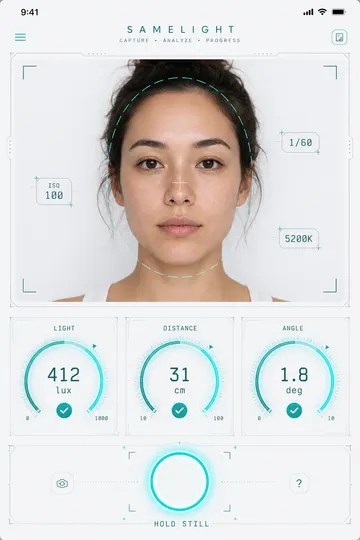
SameLight locks the camera’s ISO, exposure and white balance, then measures the moment you are standing in: how much light there is, what colour that light is, how far your face is from the lens, and how far your head is turned.
Until all four are in range the shutter stays locked. And instead of “move to a brighter area” you get the number to fix — “Move 4 cm closer to the camera.”, “Brighter by 15 percent — face a window or lamp.”, “Light looks too warm by 850 K.” A reading the app cannot take is shown as unreadable and keeps the shutter locked; it is never quietly counted as a pass.
If you want the picture anyway, you can save it as a baseline. It is marked amber, labelled not standardized, and kept out of the trend.
- Light 250–800 lux
- Colour ±500 K
- Distance 25–40 cm
- Angle ≤ 6°
It will not draw a comparison it cannot stand behind
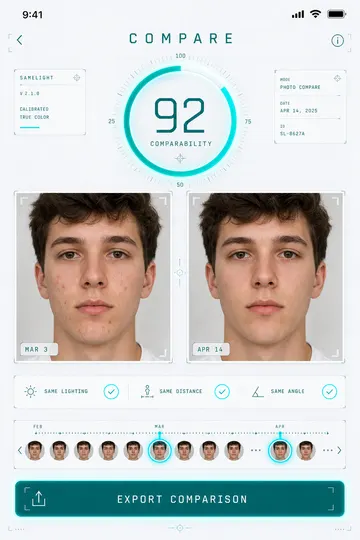
Every pair of photos gets a comparability score from 0 to 100, built from four differences: brightness, the colour of the light, the distance, and the head angle. Two photos that both cleared the gate can still be too far apart — so the score is computed for the pair, not inherited from the shots.
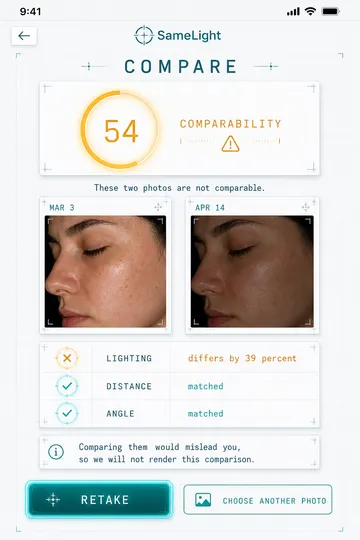
Below 70, SameLight does not render a faded, asterisked or “approximate” comparison. The aligned crops are never even computed. You are told which axis was furthest apart, by how much, and offered a retake.
Refusing is the feature. An app that will show you any two photos will eventually show you a change in lighting and let you read it as progress.
Rendered. Lighting, distance and angle all inside budget.
Not rendered. The worst axis is named and a retake is offered.
Threshold 70 · four axes · the refused state is unrepresentable in the code, not merely hidden in the UI.
On your phone, and yours to take away
Photos live in SameLight’s own storage on your iPhone, excluded from iCloud and iTunes backups. Analysis runs on the device. There is no account to create, no cloud copy, and no third-party SDK in the app.
One button writes a ZIP that opens anywhere: your original JPEGs, a CSV carrying every reading behind every photo, a PDF of the comparisons you have seen, and a README with the scoring formula and its constants — so anyone can recompute the numbers without us.
No ads. No affiliate links. No product recommendations, no commissions. Subscriptions are the only revenue this app has, and the export is free forever so that leaving is never a hostage situation.
- ZIP photos/*.jpg
- ZIP capture-params.csv
- ZIP comparisons.pdf
- ZIP README.txt
What SameLight will not do
- No skin score. No number for your face, no attractiveness rating, no grade. The only number about you is a count of visible spots on a standardized photo.
- Nothing to buy inside. No product recommendations, no affiliate links, no commissions, no shop. That is not restraint — it is how competitors in this category make most of their money, and it is the reason their advice cannot be trusted.
- No upload. Your photos, your spot counts and your capture readings are never transmitted. The only thing the app sends is an anonymous count of events, which you can switch off.
- No false comparison. When the score says two photos are not comparable, you get the reason instead of a picture.
SameLight is a photo-standardisation tool, not a substitute for a professional opinion about your skin.
Free where it matters. Paid where it is a convenience.
The category norm is a paywall before your first result. SameLight puts the paywall after the part that makes the app worth having.
$0
No account, no card, no time limit.
- Standardized capture with the four-axis gate
- On-device spot counting on every standardized photo
- Side-by-side comparison with the comparability score
- The full export — every original photo, every reading
- Deleting one photo, or everything, whenever you want
- Your first stability check
$4.99 / month · $29.99 / year
3-day free trial on the yearly plan. Auto-renews until cancelled; cancel any time in your Apple Account settings.
- The timeline beyond the rolling 14-day window
- The trend chart over your whole history
- Re-running the stability check
Nothing is deleted or hidden when the free window ends. Your older photos are still on the device and still in every export — Pro puts them back on the timeline.
Everything is unlocked, including the parts that later need Pro. There is no card to enter and nothing to cancel — during that window the app cannot show you a full-screen upgrade prompt at all.
Not on the App Store yet.
SameLight is finishing its device testing. There is no mailing list and nothing to sign up for — the App Store link will appear on this page when it is live.